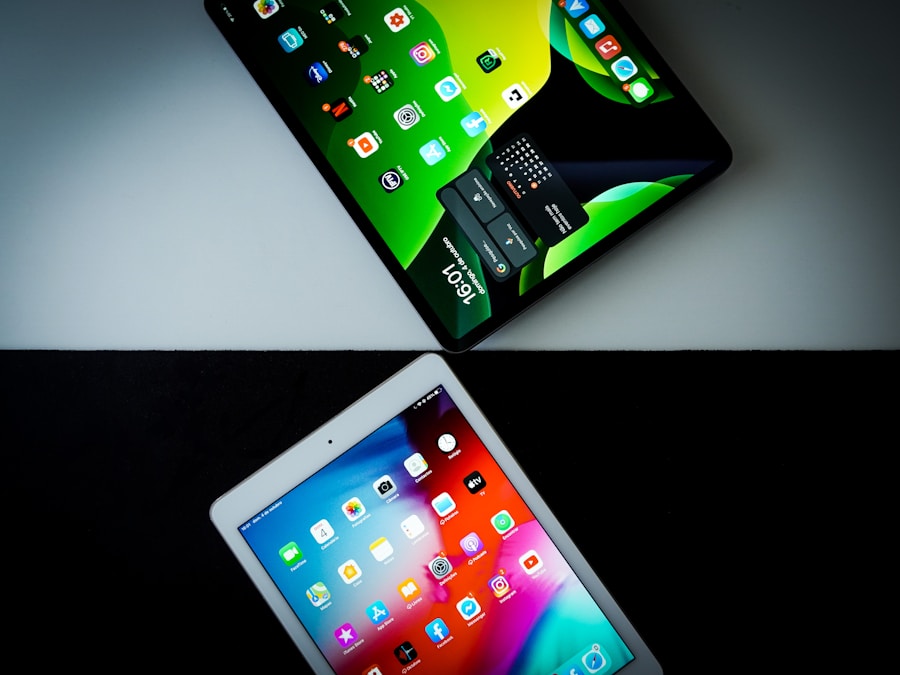
Navigating the labyrinth of iPad models can feel like a quest in itself. As someone who’s spent countless hours wrestling with specs, sketching out ideas, and binge-watching shows on every iteration, I can tell you this: there’s no single “best” iPad. The true magic lies in finding the one that’s tailor-made for you. That’s why I’ve put together this comprehensive comparison, drawing from my own experiences to help you unlock the perfect digital companion.
Display and Size: A Window to Your World
The screen is the face of your iPad, and its impact on your experience is profound. Whether you’re a digital artist, a voracious reader, or someone who simply wants to unwind with a movie, the display’s size and resolution are paramount. I’ve spent hours under the glare of different screens, and the differences, while sometimes subtle, can dramatically alter how you interact with your device.
The Compact Canvas: iPad Mini Series
For those who prioritize portability above all else, the iPad Mini has always been my go-to recommendation. It’s a device that slips effortlessly into a coat pocket or a small purse, making it incredibly convenient for note-taking on the go, quick email checks, or even some light reading. The screen size, though smaller, is still remarkably sharp. I’ve found that for consuming content or jotting down quick thoughts, it’s more than sufficient. The resolution is still crisp, delivering vibrant colors and clear text, which means your e-books and articles still look fantastic.
The Versatile All-Rounder: Standard iPad Series
The standard iPad is the workhorse of the Apple lineup, and for good reason. Its screen size strikes a fantastic balance – large enough for comfortable multitasking and media consumption, yet still manageable for hand-held use. I’ve used these models extensively for everything from browsing the web to editing documents, and the display quality has always impressed me. The resolution is more than adequate for everyday tasks, ensuring that text is sharp and images are vibrant. It’s the iPad that most people will find themselves gravitating towards, and it rarely disappoints in the display department.
The Creative Powerhouse: iPad Air Series
Stepping up to the iPad Air brings a noticeable increase in screen real estate, and with it, a more immersive experience. I find the Air’s display is particularly well-suited for creative endeavors. Drawing, sketching, or even editing photos feels more natural with the larger canvas. The higher resolution and often brighter displays on these models make a tangible difference when working with detailed visuals. It’s a sweet spot where portability is still considered, but the screen real estate opens up a new level of productivity and creativity.
The Professional’s Choice: iPad Pro Series
When I think of the ultimate visual experience, my mind immediately goes to the iPad Pro. The larger screen sizes available in this lineup are simply breathtaking. For professional-grade photo editing, video production, or complex design work, the expansive display is an absolute game-changer. The ProMotion technology, which offers adaptive refresh rates up to 120Hz, is incredibly smooth. Scrolling is fluid, drawing feels more responsive, and video playback is simply stunning. The Liquid Retina XDR display on the higher-end Pro models offers incredible contrast and brightness, making it ideal for HDR content and demanding visual tasks where color accuracy is crucial.
Performance and Processing Power: The Engine Under the Hood
The speed and responsiveness of an iPad can make or break your experience. Whether you’re juggling multiple apps, editing video, or playing graphically intensive games, the processor is the heart of the operation. I’ve pushed various iPads to their limits, and the performance differences, particularly between the entry-level and Pro models, are quite striking.
Entry-Level Excellence: Standard iPad Chips
The standard iPad models, while not sporting the latest and greatest chips, still offer remarkable performance for their price point. I’ve found them to be perfectly capable of handling everyday tasks like web browsing, email, social media, and even some light productivity apps without a hitch. For casual users, the performance is more than sufficient, delivering a smooth and lag-free experience for most common uses.
The Smart Upgrade: iPad Air with M-Series Chips
The introduction of Apple’s M-series chips to the iPad Air was a revelation. I immediately noticed a significant leap in performance. These chips offer desktop-class power in a portable package. I’ve been able to tackle more demanding tasks on the Air, such as moderate video editing and running more complex creative applications, with surprising ease. The responsiveness is sharper, multitasking feels more seamless, and the overall user experience is noticeably snappier.
Uncompromising Power: iPad Pro with Advanced M-Series Chips
When it comes to raw power, the iPad Pro models are in a league of their own. Equipped with the most advanced M-series chips, these iPads are beasts. I’ve used them for professional video editing, running complex CAD software, and even engaging in demanding multitasking scenarios, and they’ve consistently delivered. The speed at which they process information, render graphics, and handle intensive workloads is phenomenal. For anyone who demands the absolute best in performance, whether for creative professional work or high-end gaming, the iPad Pro is the undisputed champion. The difference is palpable, and it truly unlocks new possibilities for what you can achieve on a tablet.
Camera and Photography Features: Capturing Your World
While iPads aren’t typically my primary photography tool, I’ve certainly used their cameras for quick snaps, video calls, and even scanning documents. The quality and features have evolved significantly over the years, and some models now offer surprisingly capable imaging systems.
The Everyday Shooter: Standard iPad Cameras
The cameras on the standard iPad are designed for practicality. They excel at video conferencing, scanning documents with impressive clarity, and taking casual photos. I’ve found them to be good enough for capturing everyday moments or for use in apps that require visual input. They might not win awards for low-light performance, but for general use, they get the job done reliably.
Enhanced Clarity: iPad Air Cameras
The iPad Air cameras often see an upgrade over the standard models, offering improved image quality and perhaps more advanced features. I’ve noticed that photos tend to have better detail and color rendition. For those who might use their iPad for snapping product photos for online listings or for capturing higher-quality images for presentations, the Air’s camera is a welcome step up.
Professional-Grade Imaging: iPad Pro Cameras
The iPad Pro models boast the most advanced camera systems, often mirroring the capabilities of the latest iPhone models. I’ve been genuinely impressed with the quality of photos and videos I can capture with these devices. Features like LiDAR scanning on newer Pro models unlock enhanced augmented reality experiences and can even improve autofocus in low-light conditions. For anyone who intends to use their iPad for serious photography, videography, or advanced AR applications, the Pro’s camera system is a standout feature.
Battery Life and Charging: Powering Your Productivity
The bane of any portable device is a dead battery. I’ve had my fair share of frustrating moments when my iPad has given up the ghost at the most inconvenient times. Fortunately, Apple has consistently focused on delivering robust battery life across its iPad lineup, and the charging options are also quite convenient.
All-Day Endurance: Standard and Air Battery Life
Across the standard iPad and iPad Air lines, I’ve consistently found that you can expect all-day battery life with moderate usage. This means that if you’re primarily using it for browsing, emails, and light productivity, you’re likely to get through a full day without needing to plug in. This is crucial for students, commuters, and anyone who’s on the move.
Sustained Power for Demanding Tasks: iPad Pro Battery Life
The iPad Pro models, despite their more powerful components, also offer impressive battery life. While pushing them with heavy-duty tasks like video editing or intensive gaming will naturally drain the battery faster, for its performance class, it’s still remarkably good. I can usually get through a solid workday of mixed usage, which is essential when relying on it for professional work.
Convenient Charging Options: USB-C and Beyond
All modern iPads utilize USB-C for charging, which is a significant convenience. This means you can often use the same charger for your iPad, iPhone (if it’s a newer model), and other USB-C devices. The faster charging capabilities on some Pro models when paired with a compatible adapter are also a boon, allowing you to top up your battery quickly when you’re short on time.
Storage and Memory: All the Space You Need

The amount of storage you choose for your iPad can significantly influence your experience, especially if you plan to download a lot of apps, store media, or work with large files. I’ve learned the hard way that underestimating storage needs can lead to constant juggling and deletion.
For the Essentials: Base Storage Options
The base storage options available on models like the standard iPad and iPad Mini are usually sufficient for users who primarily use streaming services for media and download essential apps. I’ve found that for basic browsing and daily tasks, 64GB can be adequate, though it’s something I recommend topping up if possible.
Room for More: Mid-Tier Storage
Stepping up to 128GB or 256GB provides a much more comfortable experience for most users. I personally find 256GB to be a sweet spot for my own usage, allowing me to store a good number of apps, download movies for travel, and keep a decent library of photos and videos. It significantly reduces the need to constantly manage storage.
For the Power User and Creator: High-Capacity Storage
For professionals, creatives, and those who plan to store large video files, extensive music libraries, or download numerous high-resolution assets, the higher storage tiers on the iPad Air and especially the iPad Pro are crucial. I’ve seen options go up to 1TB or even 2TB on the Pro models, which is essential when working with uncompressed video or massive design projects. Running out of storage on a Pro model is a particularly frustrating experience, as it severely hampers your ability to utilize the device’s full potential.
Connectivity and Accessories: Expanding Your iPad’s Capabilities
The versatility of an iPad is amplified by its connectivity options and the vast ecosystem of accessories available. From seamless wireless connections to essential peripherals, these elements truly define how you can interact with your device.
Wireless World: Wi-Fi and Cellular Options
All iPads come with Wi-Fi connectivity, which is standard for most users. However, for those who need internet access on the go, the cellular models are invaluable. I’ve found the cellular option to be a lifesaver during travel or when I’m away from reliable Wi-Fi. It truly makes the iPad a standalone device that can keep you connected anywhere.
The Gateway to Peripherals: USB-C and Thunderbolt
The adoption of USB-C across the iPad lineup has been a game-changer for accessory compatibility. I can now easily connect external displays, hard drives, SD card readers, and more. The iPad Pro models, with their Thunderbolt/USB 4 ports, take this a step further, offering even faster data transfer speeds and the ability to connect higher-resolution external displays and more demanding peripherals. This is a critical consideration for anyone looking to use their iPad as a primary workstation.
Enhancing Productivity and Creativity: Apple Pencil and Magic Keyboard
No discussion of iPad accessories is complete without mentioning the Apple Pencil and the Magic Keyboard. The Apple Pencil, particularly the second generation, has transformed the iPad into a powerful digital sketchbook and note-taking tool. I find its precision and responsiveness to be incredible for drawing and annotating. Similarly, the Magic Keyboard transforms the iPad into a more laptop-like experience, with a comfortable keyboard and trackpad, making it ideal for typing and navigation. The availability and compatibility of these accessories vary slightly between iPad models, with the Pro and Air models often offering the most advanced integrations.
Price and Value: Finding Your Perfect Fit for Your Budget
Ultimately, the decision often comes down to budget. Apple’s iPad lineup offers a range of price points, each catering to different needs and expectations. I’ve always believed that the “best value” is highly personal, depending on what you intend to do with your device.
The Accessible Entry Point: Standard iPad Pricing
The standard iPad is undeniably the most budget-friendly option. I see it as the perfect entry-level device for those new to the Apple ecosystem or for individuals whose needs are primarily focused on media consumption, basic web browsing, and occasional productivity. It offers a fantastic Apple experience at an accessible price.
The Sweet Spot for Most: iPad Air Value
The iPad Air often strikes an excellent balance between price and performance. For the additional cost over a standard iPad, you gain a more powerful processor, a better display, and often improved camera capabilities. I believe the Air offers exceptional value for students, casual creatives, and anyone who wants a step up in performance and features without venturing into Pro territory.
Premium Performance, Premium Price: iPad Pro Investment
The iPad Pro models represent the premium end of the spectrum. Their higher price tag is justified by the uncompromising performance, advanced features, and professional-grade capabilities. I recommend the Pro for creative professionals, artists, and power users who will genuinely leverage its capabilities for their work or demanding hobbies. It’s an investment, but for the right user, the return in productivity and creative output can be substantial.
Choosing an iPad is a journey, and by carefully considering each of these aspects – from the vibrant display to the raw processing power, the camera’s potential, the endurance of its battery, the ample storage, the seamless connectivity, and the overall value proposition – you’ll be well on your way to finding the digital companion that perfectly fits your life. I’ve learned that taking the time to compare and contrast will ultimately lead to a more satisfying and productive experience with your new iPad.
Leave a Reply